Successful Liability Shift for Enrolled Card Is Required: Fix
What the 'successful liability shift for enrolled card is required' error means, why the issuer's 3D Secure step failed, and how merchants can fix it and protect sales.
This message means the card in question is enrolled in 3D Secure, but the cardholder’s bank did not complete the authentication step, so the checkout will not accept the payment without a liability shift. In practice, the transaction was declined by a rule that protects you, and the fix is almost always in how authentication is requested, completed or handled, not in the card itself.
The wording shows up in age verification flows, checkout plugins and gateway settings. The AgeGO help center, for example, describes the message as a sign the bank did not complete the required 3D Secure authentication. Below, we explain what the rule is doing, how to troubleshoot it as a customer and as a merchant, and how to build a setup where fewer good orders fail.
TL;DR
- The error means the card is enrolled in 3D Secure, but the issuer did not confirm the cardholder, so the payment cannot carry a liability shift.
- A customer can usually fix it by completing the bank prompt, using the banking app, trying another card or contacting the issuer.
- A merchant should check the 3DS response status, the gateway rule that enforces the shift, and whether the checkout shows the authentication window.
- A liability shift covers fraud disputes only, not “item not received” or “not as described” claims.
- Your gateway, hosting platform and merchant account each play a part, so review them together.
Table of Contents
- What the error actually means
- Why a bank fails to complete the authentication
- What the 3DS response tells you
- Does an attempted authentication still protect you?
- What a liability shift covers, and what it does not
- Card-present is a different rule
- If you are the customer: how to get the payment through
- If you are the merchant: how to fix the setup
- Gateway, hosting and merchant account: three layers, three failure points
- A worked example
- Where ChargeAct fits
- FAQ
- Sources
What the error actually means
Three terms carry the whole message. Liability shift is the transfer of responsibility for a fraud-related chargeback from the merchant to the card issuer. Enrolled means the cardholder’s bank participates in 3D Secure (sold under names like Visa Secure and Mastercard Identity Check) and the specific card is registered in that program. Required means somebody configured the checkout, the gateway or the platform to reject any payment that would leave you holding the fraud risk.
Put together, the system is saying: this card can be authenticated, authentication did not succeed, and we have been told not to process a payment you would be liable for. It is a protective setting that is doing its job, which is also why it can feel blunt when a legitimate customer is the one blocked.
One point trips up many store owners. Authenticating the buyer is not the same as the buyer being approved for the purchase. Authorization asks whether funds are available. Authentication asks whether the person at the keyboard is the cardholder. The liability rule hangs on the second question.
Why a bank fails to complete the authentication
When a card is enrolled, the issuer can challenge the buyer with a one-time code, a push notification in the banking app or a biometric check. Several things can interrupt that flow before it finishes.
The most common is a customer-side break: the text message never arrives, the buyer’s phone number on file at the bank is outdated, the banking app is not installed or logged in, or the pop-up window is blocked by the browser. Another is a timeout, where the buyer leaves the page to find the code and the session expires. A third is a merchant-side break: the challenge window renders inside a frame that is too small, a script is blocked by a security plugin, or the checkout redirects away before the bank’s response returns.
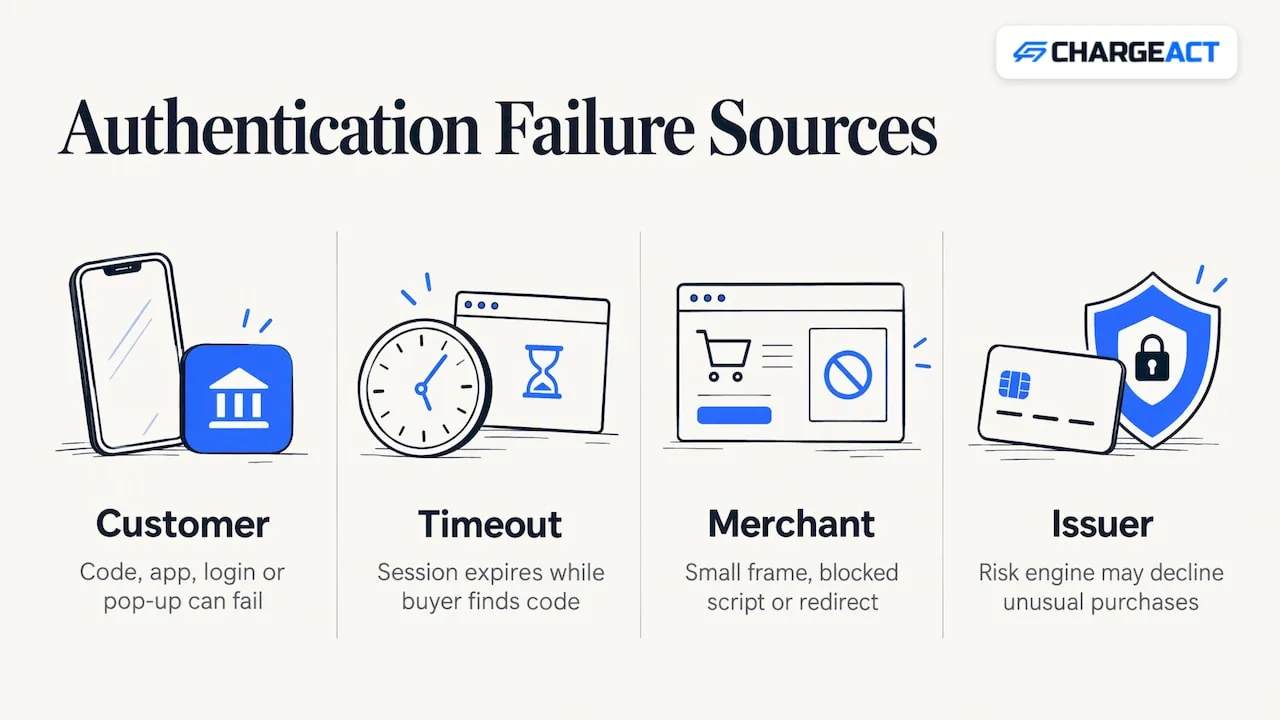
There is also an issuer-side reason. Some banks decline to authenticate transactions their own risk engines find unusual, such as a large first purchase on a new device or an unfamiliar merchant category. In that case the bank is making a judgment, and the cardholder may need to call the number on the back of the card.
What the 3DS response tells you
If you manage a store or a gateway, the fastest path to a diagnosis is the 3DS response itself. Gateway documentation describes a transaction status and an ECI (electronic commerce indicator) value that together show whether a liability shift occurred. <u>PayShield’s 3DS documentation</u> states that only a status of “Y” guarantees a full liability shift, and that for statuses “N”, “C” or “R” it recommends not attempting authorization, though the decision remains the merchant’s.
In plain terms, read the response in three steps:
- Look at the status. “Y” means the issuer authenticated the cardholder. Anything else means the shift is not assured.
- Compare it with the ECI value your gateway returns, because that indicator is what travels with the authorization request to the networks.
- Check which rule rejected the order: your gateway’s setting, a fraud tool or a plugin. The rejection message usually belongs to that rule, not to the issuer.
A useful habit is to log the status for every declined order for a couple of weeks. Patterns appear quickly. If failures cluster on one browser, the problem is in your checkout. If they cluster on one issuer, the problem is outside your control, and a fallback path becomes worth designing.
Does an attempted authentication still protect you?
This is where many merchants assume more than the rules give them. In the United States, networks have historically offered protection when a merchant checked for enrollment and the card or issuer turned out not to participate. That is the “attempted” case, and it is different from the case in this error message, where the card is enrolled and the issuer did not finish authenticating.
Because the details vary by network, version and processor, confirm how your own account treats each status rather than assuming. The status table in your gateway documentation is the right reference, and your account manager can walk you through how your processor treats each outcome. Data-only 3DS is a related trap: it passes information to the issuer to improve approval decisions, but it is not a full authentication flow and does not grant liability shift.
What a liability shift covers, and what it does not
A liability shift is narrower than its name suggests. It moves responsibility for fraud disputes, the claims where a cardholder says they did not make the purchase. It does not touch the other large category of disputes. Product not received, not as described, cancelled service and credit not processed all remain with the merchant, as do processing errors.
That matters for subscription, high-ticket and phone-order sellers, where a large share of disputes are service disputes rather than stolen-card fraud. A strong authentication setup reduces one slice of chargebacks. Clear descriptors, plain cancellation paths, reliable delivery tracking and prompt customer service address the rest. Our fraud prevention and chargeback protection solution is built around covering both slices instead of treating authentication as the whole answer.
Card-present is a different rule
Searchers often land on this error while reading about EMV, so it helps to separate the two. EMV liability shift applies to in-person transactions: if a chip card is swiped or key-entered when the terminal could have read the chip, responsibility for counterfeit fraud can move to the merchant. Visa’s U.S. guidance says that for counterfeit fraud in card-present sales where the chip was not read, liability for counterfeit fraud may shift to you, and that having an authorization does not protect you if EMV processing requirements were not met.
On the online side, the same Visa guide notes that a common trigger for a fraud dispute under reason code 10.4 is a card-absent transaction processed without additional authentication such as 3-D Secure. So the two regimes mirror each other: chip for the counter, 3DS for the screen. The error in this article belongs to the second.
If you are the customer: how to get the payment through
Work through these in order, since each step is quick.
First, finish the bank prompt without leaving the page. Open the banking app before you pay if your bank uses push approvals, and keep the browser tab in the foreground. Second, allow pop-ups for the site and try a different browser, or turn off extensions that block scripts for a minute. Third, confirm your phone number and email with your bank, since an outdated number is the most common reason a code never arrives. Fourth, try again with another enrolled card, or a digital wallet, which handles authentication on the device itself. If none of this works, call the number on the back of the card and ask whether the bank blocked online authentication on that card.
Do not keep retrying the same failing attempt many times in a row. Repeated declines can trigger a bank’s own fraud flags and make the problem stick.
If you are the merchant: how to fix the setup
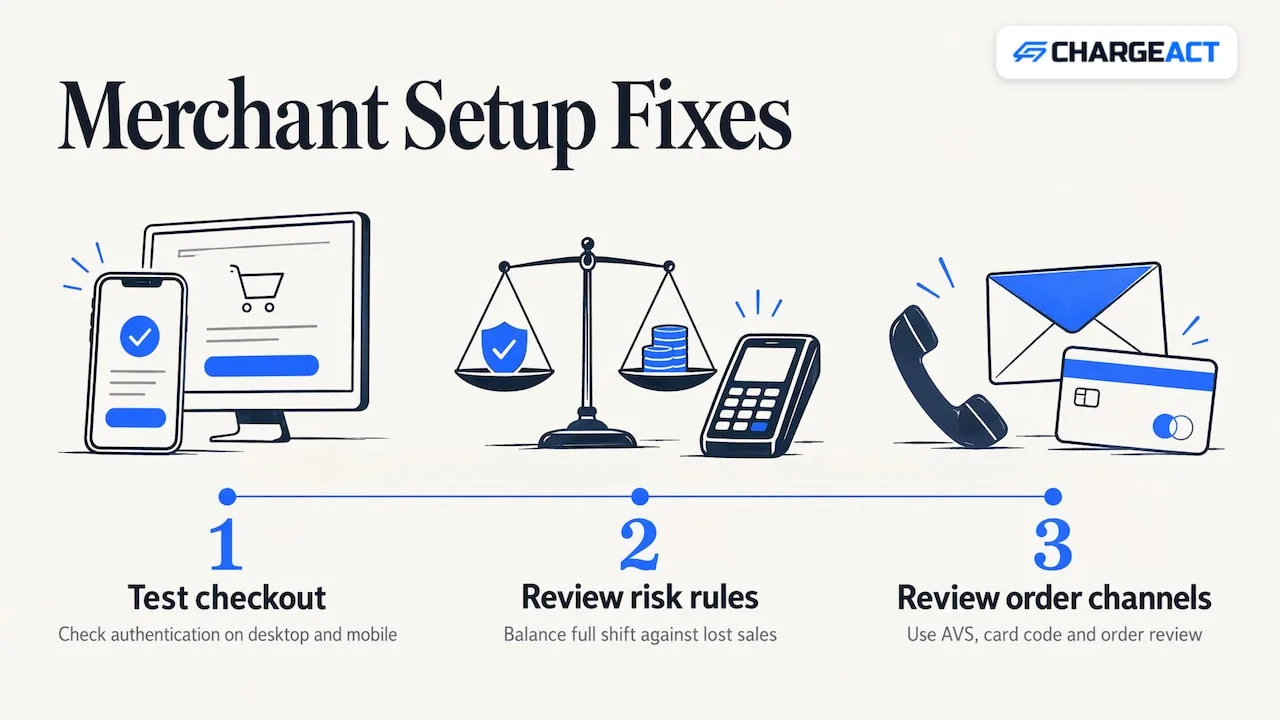
Start with the checkout. Confirm the authentication window opens and is large enough to show the bank’s page on both desktop and mobile. Test with a real card on a phone, because many failures only occur on small screens. Make sure no script blocker, caching layer or redirect rule strips the response that comes back from the issuer.
Next, look at how strict your rule is. A hard requirement that every enrolled card must produce a full shift is the safest posture against fraud disputes, but it gives up some sales. Many merchants pair it with risk-based logic: frictionless authentication for low-risk orders, a step-up challenge for risky ones, and a fallback to another payment method when authentication fails. Your gateway and account manager can tell you which of those options your configuration supports. For higher-value orders the strict posture is often the right call, because the cost of one fraudulent chargeback is larger than the margin on a retried sale.
Then review the way you take orders. Phone and mail orders do not go through a 3DS window at all. If a share of your sales arrive that way, a MOTO payment setup is designed for them, and your fraud controls there rest on address verification, card code checks and your own order review, not on a liability shift.
Gateway, hosting and merchant account: three layers, three failure points
This error sits at the intersection of three pieces that are often managed by different people, and a problem in any one can look the same to the customer.
At the time of writing, we recommend using the NMI gateway. Third-party payment systems incur a third-party transaction fee in addition to the costs of their merchant account, which is worth weighing when you choose where authentication and routing run. Authorize.net and other options are also available, and the right one depends on your industry, your volume and your checkout platform. Whichever you pick, confirm that it supports the 3DS version and the response fields your store needs.
The hosting platform is a separate layer. Depending on the industry you are in, the hosting environment may not be ideal if your content could violate the host’s terms of service. Shopify is a well-known example. Even if your merchant account is up to par and compliant, the host’s policy may shut your website down, without affecting your merchant account. A sudden checkout failure can therefore be a hosting problem, not an authentication problem, so check your store’s status and notices before you rewrite your payment settings.
The merchant account is the third layer. It decides which risk controls and which authentication options are available to you, and how disputes are handled when they arrive. For businesses in categories that mainstream providers tend to decline, such as firearms, CBD and supplements, this layer matters most, because stability here keeps everything above it running. Our guide to how high-risk credit card processing works explains the underwriting side in more detail, and the piece on the signals that get merchants silently flagged covers what a processor watches for once you are live.
A worked example
Consider a supplement brand selling a monthly subscription. A customer with an enrolled card signs up, the issuer sends a push notification, and the customer never sees it because their banking app is closed. The checkout waits, times out and returns the liability shift error. The brand sees a lost first order, and the customer assumes the site is broken.
The fix has three small parts. The checkout displays a clear message telling the buyer to approve in their banking app and keep the page open. The timeout is extended so the buyer has time to respond. A secondary option, such as a wallet payment, is offered when authentication fails. None of this loosens the protection. It reduces the number of legitimate buyers who fail, while orders that cannot be authenticated still stop.
For renewals, the picture changes again. Recurring charges after the first payment are typically processed without the customer present, so the first authentication and the way the payment credentials are stored matter. Ask your account manager how recurring billing is treated under your setup, since processor handling differs.
Where ChargeAct fits
If this error has you rethinking your payment stack, the underlying question is usually stability: will your processing keep working when volume spikes, when a dispute pattern appears or when a mainstream provider changes its policy on your industry? We build tailored payment processing for high-risk and complex merchants, with a dedicated account manager for each account, underwriting based on how your business actually operates, backup placements and fraud protection tools.
Our merchant accounts, online payments and gateway integration support cover ecommerce and retail, and our high-risk merchant account is designed to stay live for industries traditional processors decline. Pricing depends on your business, so please request a quote from our sales team for your specific situation. Approval is subject to underwriting and is never guaranteed.
FAQ
What does “successful liability shift for enrolled card is required” mean?
It means the card is enrolled in 3D Secure but the issuing bank did not complete the authentication step. Because the checkout is set to require a shift of fraud liability to the issuer, it rejects the payment. The customer can usually resolve it by completing the bank’s prompt.
What is the difference between EMV and 3D Secure liability shift?
EMV applies to in-person payments, where reading the chip, not swiping, keeps counterfeit fraud liability with the issuer. 3D Secure applies to online card-not-present payments, where authenticating the cardholder does the same job for fraud disputes.
Should I turn the requirement off to save sales?
That is a risk decision for your business, and it is made in your gateway or fraud tool settings. Many merchants keep the requirement for high-value orders and use risk-based authentication or a fallback payment method for smaller ones. Talk to your account manager before changing it.
Can my website be shut down even if my merchant account is fine?
Yes. Your hosting platform enforces its own terms of service, and depending on your industry, content that conflicts with them can take your site offline without affecting your merchant account. Review the host’s policies for your category before you build your checkout there.
Sources
Recommended
How it works
Call us
Tell us where things stand today - your current processor, your rates, and what's not working.
We review where you stand
A real underwriter looks at your statements and account history - no black-box scoring.
You hear what's possible
We lay out your options in plain terms, including what we can and can't do for your business.
Why ChargeAct
We underwrite the businesses others decline
High-risk isn't a dirty word to us - it's the merchant category we specialize in every day.
A human reviews your account, not just an algorithm
Statements get read by people who understand your industry, not auto-rejected by a risk score.
A dedicated manager who knows your account
When something comes up, you call a person who already knows your business - not a queue.
Stop guessing what your processor will do next.
Talk to a real underwriter about where your business stands - no obligation, no runaround.
(888) 329-5717