Ecommerce Payment Integration: A Guide for High-Risk Merchants
How ecommerce payment integration works, from gateway and merchant account to testing, PCI scope and costs, and why account stability comes before code.
Ecommerce payment integration is the work of connecting your checkout to a payment gateway, a processor and a merchant account so a card swipe on your site becomes money in your bank. The code is the easy part. For firearms, CBD, wellness, high-ticket and subscription sellers, the harder question is whether the account behind the integration will stay open once volume grows. Integrate against a stable, properly underwritten merchant account first, and the technical work holds up. Integrate against an account built for low-risk retail, and a freeze can switch off your checkout overnight.
TL;DR
- Integration needs three pieces working together: a storefront or checkout, a payment gateway, and a merchant account with a processor behind it.
- Verify every payment on your server with the gateway before you ship, and treat anything coming back through the browser as untrusted.
- How you collect card data decides your PCI scope: fully hosted fields are the lightest route, while direct-post forms and your own JavaScript add more to validate.
- Underwriting that matches your real operations matters more for high-risk sellers than which plugin you install. Ask for a quote built on your business, not a generic price list.
- Plan backup processing before you need it, so one account decision never stops all sales.
Table of Contents
- What ecommerce payment integration actually connects
- Gateway, processor, merchant account: who does what
- The integration steps, and where each one goes wrong
- Security and PCI: how your integration choice sets your scope
- Costs: what to expect when you integrate
- Questions high-risk sellers should answer before integrating
- Where ChargeAct fits
- FAQ
- Sources
What ecommerce payment integration actually connects
The PCI Security Standards Council describes an e-commerce payment system broadly. In its Guide to Safe Payments, it covers your website and shopping pages, the payment page or form, any connected systems, and the connections to the merchant bank. It also says the system can be fully outsourced, partly managed with third-party help, or run entirely by the merchant.
That definition matters because "integration" means different things depending on who you ask. A developer thinks of API calls. A finance lead thinks of settlement and reserves. A compliance owner thinks of card data. All three are the same project.
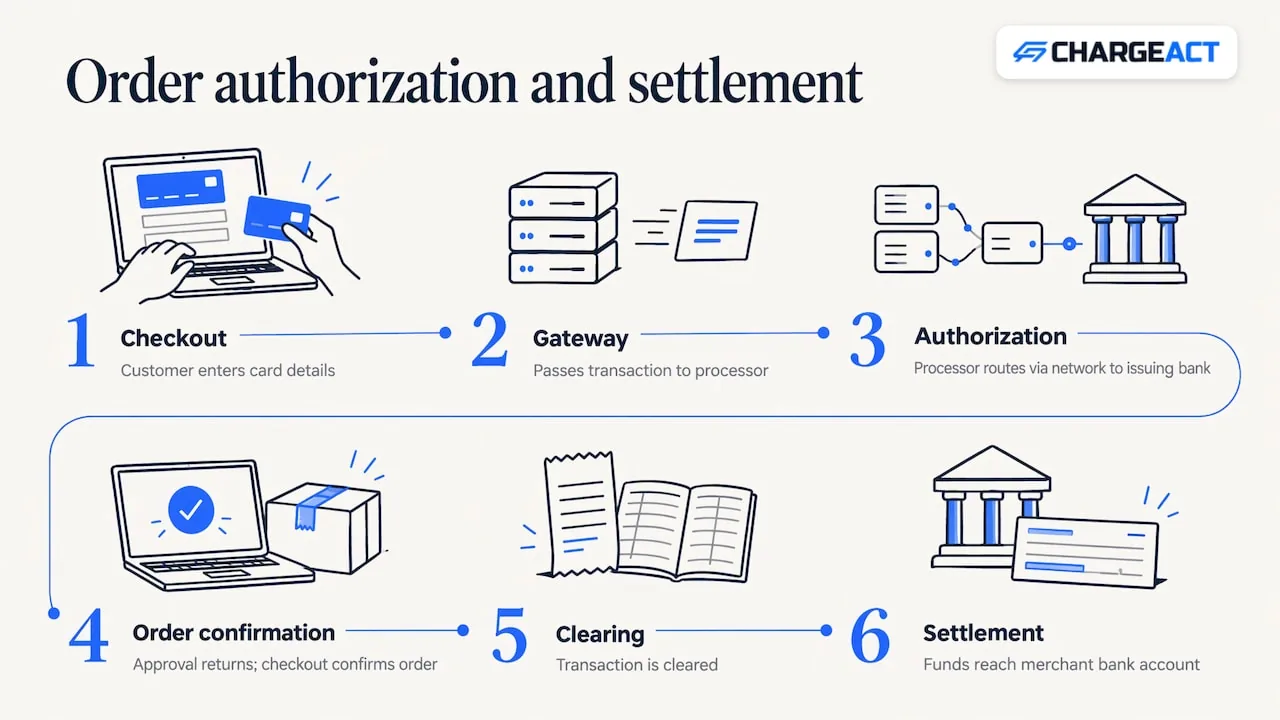
Here is the path a single order takes. The customer enters card details on your checkout. Those details go to the gateway, which passes the transaction to the processor. The processor routes it to the card network and the issuing bank for authorization. If it is approved, your checkout confirms the order. Later, the transaction is cleared and the funds are settled to your merchant bank account. Each hop can fail, and each hop belongs to a different party.
Gateway, processor, merchant account: who does what
The vocabulary trips up a lot of owners, so it is worth fixing the terms once.
According to the U.S. International Trade Administration, a payment gateway is website software that lets customers complete transactions on your site, authorizes and processes the payment, and delivers it securely to your account. It requires a merchant account, and the two services are often bundled. The same page explains that a merchant account is a bank account that lets a business accept credit and debit cards, doing online the job it does in a physical store.
The processor is the third piece. A university treasury glossary at UC Santa Barbara describes a processor as the entity merchants engage to handle card transactions for them: authorization, clearing and settlement with the card networks, and settling funds to the merchant's bank account. The gateway, by contrast, is the technology that lets you submit transactions and gives you transaction management and reporting.
Your ecommerce platform sits on top of all of this. It is the cart and catalog, and it talks to the gateway through a plugin, a hosted payment page or an API.
Why does this split matter to a high-risk seller? Because your gateway can be perfectly integrated while the merchant account behind it is the weak link. When a general-purpose processor decides your category is outside its comfort zone, the gateway code does not change, but approvals stop and funds get held. The integration problem becomes an account problem.
The integration steps, and where each one goes wrong
1. Settle the merchant account before you write code
Choose the account first, because the account determines which gateways you can use and how your funds are handled. Underwriting looks at what you sell, how you fulfill, your refund and dispute history, and how you market. Generic processors often sort merchants by category label. We underwrite based on how your business actually operates, and each merchant gets a dedicated account manager. If you sell firearms, CBD, supplements, high-ticket goods or subscriptions, start with our high-risk merchant accounts rather than discovering the limits after launch.
The usual failure here is signing up fast with a processor that accepts you today and reviews you next quarter. Approval is never something we or anyone can promise in advance, so build your plan on a fit with your real operations, not on a hope.
2. Pick the integration method
There are three common patterns. A hosted payment page sends the customer to the processor's page to pay. Embedded or hosted fields keep the customer on your site while the gateway captures the card data in its own frames. A direct API or direct-post form lets your server or page handle card fields directly. Hosted options are quicker and carry less security burden. Direct methods give you more design control and more responsibility.
The failure point is choosing for looks and discovering later that your checkout pulled more systems into compliance scope than you expected. The next section explains why.
If your platform is a mainstream cart, check that the gateway you want is compatible with both your existing merchant account and your platform. The U.S. government's guidance on selecting payment gateways makes this point directly. Our gateway integration support for ecommerce stores exists for this step, so your cart and your account are matched before launch.
3. Build the server-side logic that protects you
The most expensive integration mistakes are not visual. OWASP's Third Party Payment Gateway Integration Cheat Sheet warns that insecure integrations can lead to payment spoofing, order manipulation and fraud. Its recommendations are practical:
Validate cart details such as product IDs, prices and discounts on the backend, never in the browser. Verify payment status server-side by calling the gateway's API before you fulfill an order. Match the expected amount, currency and order ID. Authenticate callbacks with HMAC signatures or secret tokens. Make order handling idempotent, so a retried callback cannot create a second shipment.
OWASP singles out unauthenticated or spoofed callbacks as the most dangerous weak point, and says redirect parameters should be treated as untrusted because they can be manipulated to trigger repeated fulfillment, such as extra shipments or account credits. For a firearms retailer or a high-ticket seller, a single double-shipped order is a real loss, not a rounding error.
4. Test the whole loop, not just the happy path
Use your gateway's sandbox to run approvals, declines, partial refunds, voids and timeouts. Replay the same callback twice and confirm the order is processed once. Change the amount in a request and confirm your server rejects it. If you take phone orders, test that channel too: our MOTO payment processing handles mail and telephone orders, and it should be tested alongside the website, since staff keying cards by hand create their own error patterns.
OWASP also recommends logging all payment attempts with timestamps and IPs, and alerting on unexpected order statuses and excessive callback attempts. Set those alerts up before launch, not after the first incident.
5. Go live with monitoring and a fallback
Launch with a small slice of traffic, watch authorization rates and declines by card type, and confirm settlement lands as expected. Then plan redundancy. High-risk sellers should not run on a single point of failure. Backup placements, which we design for industries traditional processors decline, give you a second route if one is paused or reviewed.
Security and PCI: how your integration choice sets your scope
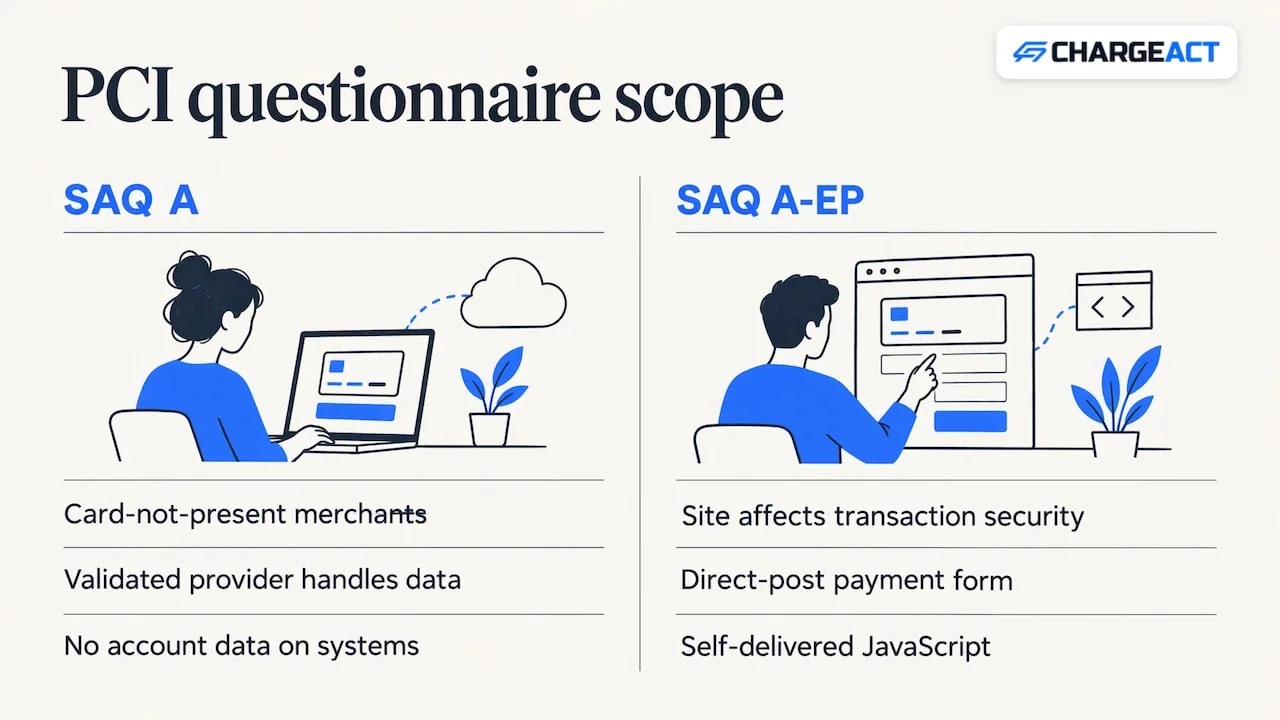
PCI DSS is the card industry's data security standard, and merchants validate compliance through self-assessment questionnaires, known as SAQs. The PCI Council's SAQ instructions for PCI DSS v4.0.1 explain the split that matters most for ecommerce. SAQ A applies to card-not-present merchants who have completely outsourced all account-data functions to a PCI DSS-validated third-party provider and do not store, process or transmit account data on their own systems. SAQ A-EP applies when your site has functionality that affects the security of the payment transaction, such as a direct-post payment form or JavaScript you deliver yourself.
In plain terms: the more of the card entry you hand to a validated provider, the smaller your compliance footprint. The more you customize on your own pages, the more you carry. Which questionnaire applies to you depends on your exact setup, so confirm it with your acquirer or a qualified assessor.
OWASP adds one rule worth printing: do not retain sensitive authentication data such as card verification codes or PIN data after authorization, even encrypted.
Fraud and dispute controls are part of integration
For high-risk categories, chargebacks are the number that decides how long an account stays healthy. Build fraud screening and dispute handling in at integration time, not after the first spike. We offer fraud protection and chargeback defense for this reason, and our ecommerce fraud prevention playbook lays out the layered approach.
What changed recently in US payment rules
Two developments are worth knowing. First, Nacha's ACH fraud-monitoring rules took effect in phases. Phase 1 began March 20, 2026 for all originating banks, plus larger non-consumer originators and third parties and larger receiving banks. Phase 2 began on June 19, 2026 for the remaining non-consumer originators and receivers, and procedures must be reviewed at least annually. If you accept bank payments alongside cards, ask your provider how they handle this. Nacha's own release says the rules make fraud monitoring a shared, evolving responsibility.
Second, in October 2026 the PCI Council published additional guidance on securing AI in payment environments. It is not mandatory, and existing PCI standards take precedence where they differ. If you use AI tools in support, fraud review or checkout, it is worth reading.
Costs: what to expect when you integrate
Fees come in layers. The U.S. government's gateway selection guide separates monthly recurring fees, which you pay regardless of order volume, from per-transaction fees, which may be fixed or variable. Some gateways discount at higher volume. Bundled gateway-plus-merchant-account offers are often easier to set up and carry lower monthly fees, but may add per-transaction charges.
Two practical points follow. Compare the total cost across a realistic month of your own orders, including refunds and disputes, not the headline line. And ask how the pricing is structured. We price on a transparent interchange-plus model aligned to volume. Because your risk profile, average ticket and sales channels shape the result, we do not publish rates: request a quote from our sales team for your specific business.
If you sell across borders, settlement and payouts can involve intermediary banks that take their own cut. This explainer on correspondent bank fees shows who pays them and how they arise, which helps when you budget for international orders.
Questions high-risk sellers should answer before integrating
Before you commit engineering time, get clear answers to these, in writing where possible. How is my business underwritten, and on what facts? How are reserves and held funds handled, and what triggers a change? What happens to my processing if volume spikes during a launch, a seasonal peak or a promotion? Is there a second account or placement ready if the first is paused? Who is my named contact when something breaks?
These are the failures that hurt merchants who were dropped, frozen or limited by general-purpose processors: the integration was fine, but the account was not designed for their category or their growth. The same logic applies to firearms and FFL sellers facing regulatory scrutiny, CBD and hemp stores, wellness and nutraceutical brands, subscription and high-ticket sellers, and service businesses such as gyms, event venues, floral shops, tow companies and boat rentals, where large one-off charges and card-not-present orders draw extra attention. For a closer look at how underwriting works for these categories, read our guide to high risk credit card processing.
Where ChargeAct fits
We provide payment processing built for high-risk merchants, with merchant accounts matched to your risk profile, online payments, gateway integration support for ecommerce stores, fraud protection, chargeback defense, MOTO and mobile options, and digital wallets. Every merchant has a dedicated account manager who plans around volume spikes and regulatory shifts, and backup placements are part of how we approach stability.
If you are mapping out a new checkout or replacing one that keeps getting interrupted, start with our ecommerce payment processing page, or read how an ecommerce merchant account works before you talk to us. Approval depends on underwriting, and we do not promise it, but we begin by looking at how your business really runs.
To see how the pieces fit for your store, review our payment processing services and ask our team for a quote.
FAQ
What is the difference between a payment gateway and a merchant account?
A merchant account is the bank account that lets you accept card payments. A gateway is the software that captures the payment on your site and sends it onward for authorization. You need both for online sales, and they are often sold together, according to the U.S. International Trade Administration.
How long does ecommerce payment integration take?
It depends on the method and on underwriting. A hosted page or a plugin for a mainstream cart is far quicker than a custom API build. For high-risk categories, account review is often the longer step, so start it before development.
Do I need PCI compliance if I use a hosted checkout?
Yes, every merchant that accepts cards has obligations, but a fully outsourced setup can qualify for the lighter SAQ A, according to the PCI Council's instructions. Which form applies depends on your exact setup, so confirm it with your acquirer.
Can I take phone orders and web orders on the same account?
In many setups, yes. Mail and telephone orders are a separate channel with their own risk patterns, so tell your provider about both at the start. Our MOTO payments page explains how we handle them.
What should I do if my current processor froze my funds?
Gather your recent statements, dispute records and fulfillment proof, then talk to a provider that underwrites high-risk businesses on actual operations. Our team can review your situation and quote for your business, though approval is never guaranteed.
Sources
- Guide to Safe Payments, PCI Security Standards Council
- eCommerce Payments, U.S. International Trade Administration
- Credit Card Merchant Terminology, UC Santa Barbara Business & Financial Services
- Third Party Payment Gateway Integration Cheat Sheet, OWASP
- SAQ Instructions and Guidelines, PCI DSS v4.0.1
- Selecting Payment Gateways, Privacy Shield
- Fraud Monitoring Phase 1, Nacha
- New Nacha Risk Management Rules Now in Effect
- PCI SSC Publishes Additional Guidance on Securing AI in Payment Environments
- Correspondent Bank Fees: Who Pays, How Much, How to Avoid
Recommended
How it works
Call us
Tell us where things stand today - your current processor, your rates, and what's not working.
We review where you stand
A real underwriter looks at your statements and account history - no black-box scoring.
You hear what's possible
We lay out your options in plain terms, including what we can and can't do for your business.
Why ChargeAct
We underwrite the businesses others decline
High-risk isn't a dirty word to us - it's the merchant category we specialize in every day.
A human reviews your account, not just an algorithm
Statements get read by people who understand your industry, not auto-rejected by a risk score.
A dedicated manager who knows your account
When something comes up, you call a person who already knows your business - not a queue.
Stop guessing what your processor will do next.
Talk to a real underwriter about where your business stands - no obligation, no runaround.
(888) 329-5717